O365 prompting for an alternative email address

By | October 31, 2022

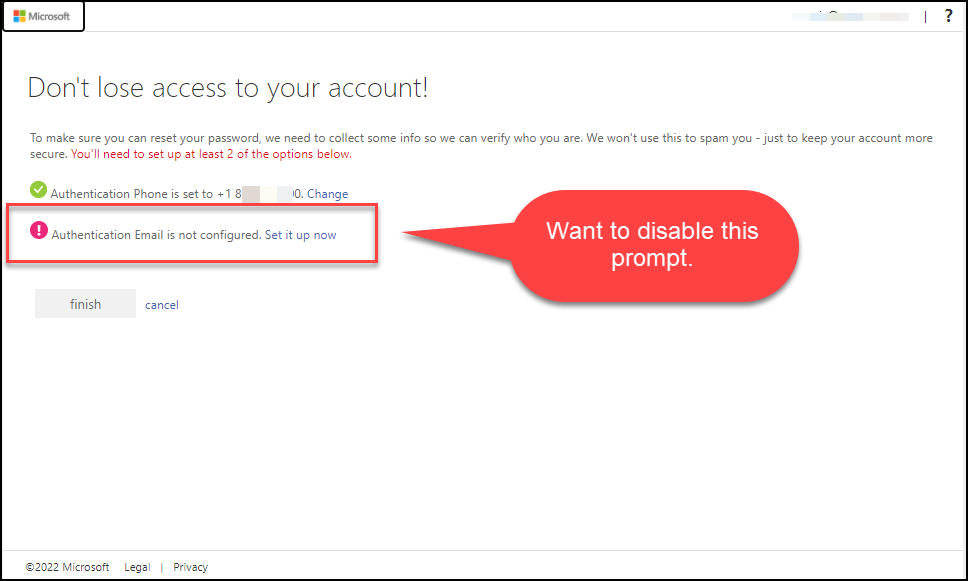
Recently, O365 started prompting users in my organization during sign-in to add an alternative (Authentication verification) email address. This is not an option we turned on, nor is it an option I wanted to be enabled. If the user needs help resetting their password or having issues signing in, our policy is for them to contact our helpdesk.

Alternative email / Authentication email prompt I never asked for.

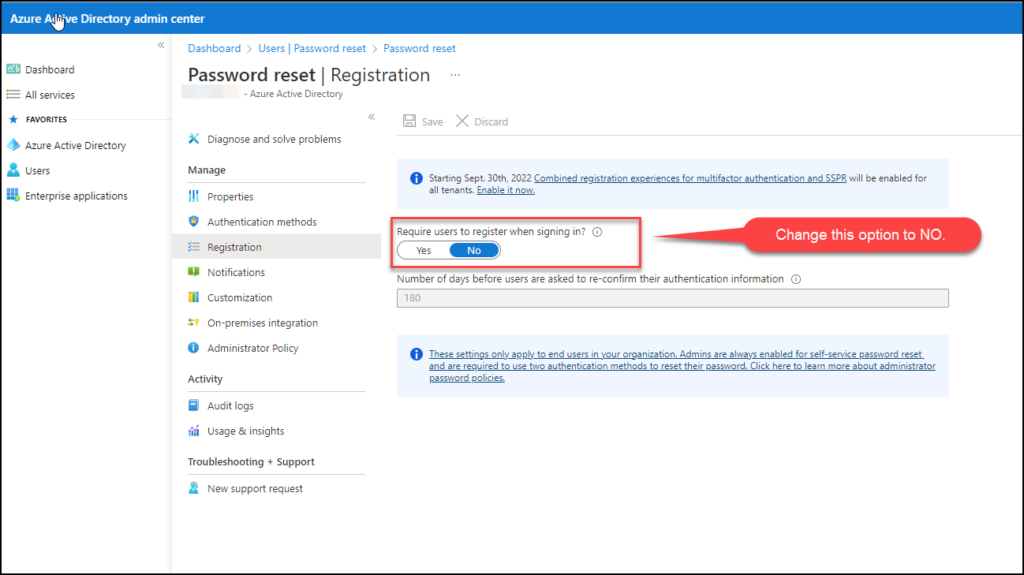
To remove this, you will need to go into your admin portal. Then go into Azure Active Directory, then USERS, then REGISTRATION. Change the option, “Require user to register when signing in“, to NO.

Select NO for this option.

Now your users will no longer get prompted to enter an alternative email address for authentication verification. Our policy is that the IT department should be contacted.

Idiots using RAID0

By | October 20, 2022

About once a month I read a post somewhere that some poor schmuck is using or wanting to use RAID0 for spanning two drives together or thinking their SSD’s going to get better performance.

If you are one of those idiots, we cannot be friends. I cannot deal with that amount of stupidity.

RAID0 was originally designed to split data across multiple mechanical drives for improved performance with scientific calculations with older computers and storage. It was always known as volatile (Like 20 years ago). Now days, there is absolutely no reason to use it.

A Few Favorite Applications

By | August 19, 2022

Here is a very short list of a few of my favorite applications and utilities that I seem to install on almost all Linux workstations I use (And some servers). I could really grow and evolve this article into its own section one day. One note, I typically will always look for a flatpak version (Especially for Evolution), and use that before looking for a native install. Just my preference as flatpaks are usually updated quite often.

What IP – Neat utility used mostly on my laptop when I am at remote sites to quickly find the external and local IP, or a virtual interface’s. Great for verifying VPN connections and finding other devices on your LAN.

Flameshot – Quick screenshot utility with several nice options. Unfortunately, nothing beats Snag-it on windows for an ultimate screenshot utility, but Flameshot does a better job than most others that are supported on Linux. A must-have for any Linux desktop.

Flameshot in action.

Angry IP Scanner – Cross platform IP and basic port scanner. I use this mainly on my laptop to scan either for IP cameras or remote locations I am working in to identify network devices. Excellent tool, and not overbuden with features. Also cool feature to click on anything with a port and it can launch typical method to access (ie, web browser for port 80 and 443).

Angry IP Scanner

Grsync – GUI for rsync. Easier than using cli at times. I use rsync quite a bit to sync directories and files across network shares from my local machine or flash drives. Grsync is a GUI for the rsync utility that just makes it easier to use especially if you use any of the arguments such as always checksum.

Grsync gui.

Midnight Commander – A great file manager during shell access. If you remember the old Norton Commander for DOS, this is the Linux version. I use this to quickly navigate a filesystem, copy, move, and edit files and more.

Midnight commander dual pane file manager.

Evolution – Gnome’s outlook type PIM client. Is compatible with O365. There is just really no replacement to the original Outlook client used in Windows. The web version is pretty good, but sometimes nothing beats using an actual client. Evolution has come a long way and now has support for O365 support.

Evolution

Catfish File Search – GUI file search utility. I always struggle when I use the CLI for find. I never remember the arguments fast enough to be quick, so catfish helps me out.

Catfish

Remmina – Remote client for RDP, VNC, SSH, etc. A nice program to organize all the remote machines you access regardless of protocol. SSH, RDP, VNC and more supported.

Remmina

Updating the terminal shell

Fancy bash prompt is a script along with the powerline font to install on your machine to provide highlighting terminal inputs.

Neofetch is a system information app that almost everyone with a Linux system has. I added this to run every time I open a shell by adding the neofetch command to my bashrc file.

The last two lines of my .bashrc file.

The result:

Neofetch and Fancy Basch Script running every time I open a terminal window.

Installing OpenConnect

By | May 20, 2022

I’ve been using Cisco’s AnyConnect client to connect my Pop!_OS workstation to my work VPN. The AnyConnect client is ok, but I want to use the network manager built into my workstation. To do this, I needed to install OpenConnect. To do this, open a terminal and run the following command:

sudo apt install openconnect network-manager-openconnect network-manager-openconnect-gnome

Then go into Settings / Network, and add a VPN connection. Select OpenConnect.

From this window you can provide your VPN connection a custom name, and enter the gateway of the Cisco VPN server you are trying to connect to. Then click Add.

Once added, I click click the slide to enable the connection to test. I am prompted for my VPN username and password. This is good.

VPN Connection can also be accessed directly from the taskbar.